lab-05 - Secure virtual networks using AVNM rule-set
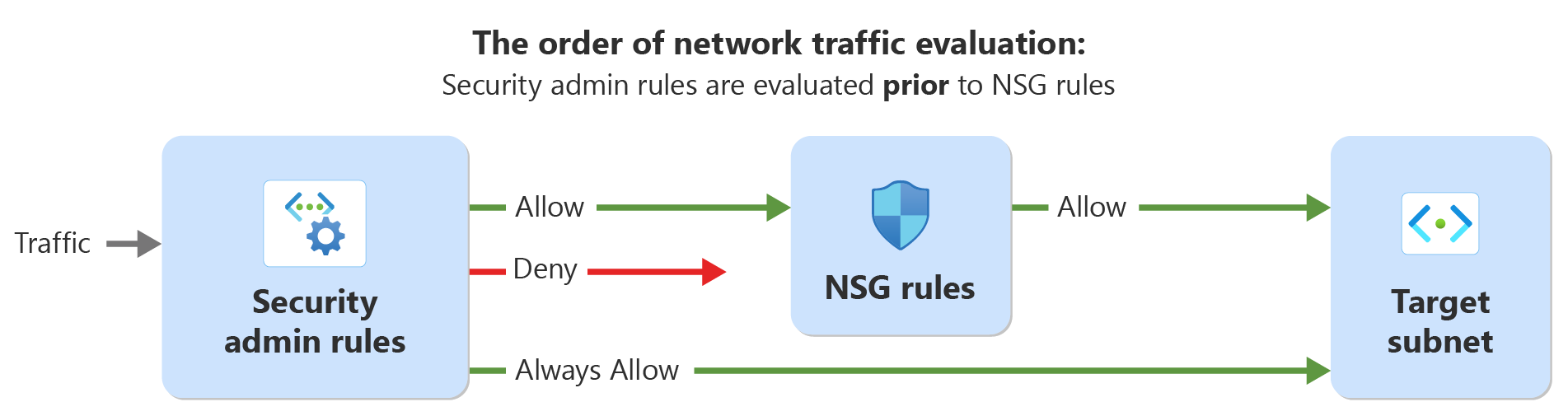
Task #1 - Create new Security Configuration using Bicep
In this task we will implement security rules to fullfil the following "business requirements":
- SSH sessions to spokes VMs only allowed from hub VM
- RDP traffic is now allowed
- Any traffic to Internet is denied, except for http and https to
ifconfig.me
This business requirement will be implemented using the following Admin Security Rules:
- deny SSH and RDP to all VNets
- allow SSH from hub VM (
10.9.0.132) to spokes VMs - deny Internet access for all VNets
- allow http and https to
ifconfig.me (34.160.111.145)from hub VM
Before we implement these rules, let's check that:
- it's possible to SSH (via Bastion) to vm-hub-westeurope
- it's possible to SSH (via Bastion) to vm-spoke1-westeurope
- you can curl ifconfig.me and curl google.com from vm-hub-westeurope
First, let's SSH into the hub VM:
# Get hub VM resource ID
$vmId = (az vm show --name vm-hub-westeurope --resource-group rg-westeurope-avnm-labs --query id --output tsv)

az network bastion ssh --name bastion-westeurope --resource-group rg-westeurope-avnm-labs --target-resource-id $vmId --auth-type password --username iac-admin

# Test curl commands
curl ifconfig.me
curl google.com

# logout from VM
exit
Now, let's SSH into the spoke1 VM:
# Get vm-spoke1-westeurope VM resource ID
$vmId = (az vm show --name vm-spoke1-westeurope --resource-group rg-westeurope-avnm-labs --query id --output tsv)

az network bastion ssh --name bastion-westeurope --resource-group rg-westeurope-avnm-labs --target-resource-id $vmId --auth-type password --username iac-admin

# Test curl commands
curl ifconfig.me
curl google.com
At this moment everything is wide opened.
Now, let's implement security rules using Bicep. Create new sc-westeurope.bicep file with the following content:
resource networkManager 'Microsoft.Network/networkManagers@2024-07-01' existing = {
  name: 'vnm-westeurope-avnm-labs'
}

resource securityAdminConfiguration 'Microsoft.Network/networkManagers/securityAdminConfigurations@2024-07-01' = {
  parent: networkManager
  name: 'sc-westeurope'
  properties: {
    applyOnNetworkIntentPolicyBasedServices: []
    networkGroupAddressSpaceAggregationOption: 'None'
  }
}

resource ng_hub_westeurope 'Microsoft.Network/networkManagers/networkGroups@2024-07-01' existing = {
  parent: networkManager
  name: 'ng-hub-westeurope'
}

resource ng_online_westeurope 'Microsoft.Network/networkManagers/networkGroups@2024-07-01' existing = {
  parent: networkManager
  name: 'ng-online-westeurope'
}

resource ng_spokes_westeurope 'Microsoft.Network/networkManagers/networkGroups@2024-07-01' existing = {
  parent: networkManager
  name: 'ng-spokes-westeurope'
}

resource ruleCollection 'Microsoft.Network/networkManagers/securityAdminConfigurations/ruleCollections@2024-07-01' = {
  parent: securityAdminConfiguration
  name: 'default'
  properties: {
    appliesToGroups: [
      {
        networkGroupId: ng_hub_westeurope.id
      }
      {
        networkGroupId: ng_online_westeurope.id
      }
      {
        networkGroupId: ng_spokes_westeurope.id
      }
    ]
  }
}

resource allow_outbound_ifconfig_me 'Microsoft.Network/networkManagers/securityAdminConfigurations/ruleCollections/rules@2024-07-01' = {
  parent: ruleCollection
  name: 'allow-outbound-ifconfig-me'
  kind: 'Custom'
  properties: {
    priority: 18
    direction: 'Outbound'
    access: 'Allow'
    sources: [
      {
        addressPrefix: '*'
        addressPrefixType: 'IPPrefix'
      }
    ]
    destinations: [
      {
        addressPrefix: '34.160.111.145'
        addressPrefixType: 'IPPrefix'
      }
    ]
    destinationPortRanges: [
      '80'
      '443'
    ]
    protocol: 'Tcp'
  }
}

resource allow_ssh_from_hub 'Microsoft.Network/networkManagers/securityAdminConfigurations/ruleCollections/rules@2024-07-01' = {
  parent: ruleCollection
  name: 'allow-ssh-from-hub'
  kind: 'Custom'
  properties: {
    priority: 8
    direction: 'Inbound'
    access: 'Allow'
    sources: [
      {
        addressPrefix: '10.9.0.132'
        addressPrefixType: 'IPPrefix'
      }
    ]
    destinations: [
      {
        addressPrefix: '*'
        addressPrefixType: 'IPPrefix'
      }
    ]
    destinationPortRanges: [
      '22'
    ]
    protocol: 'Tcp'
  }
}

resource allow_ssh_to_hub 'Microsoft.Network/networkManagers/securityAdminConfigurations/ruleCollections/rules@2024-07-01' = {
  parent: ruleCollection
  name: 'allow-ssh-to-hub'
  kind: 'Custom'
  properties: {
    priority: 6
    direction: 'Inbound'
    access: 'Allow'
    sources: [
      {
        addressPrefix: '*'
        addressPrefixType: 'IPPrefix'
      }
    ]
    destinations: [
      {
        addressPrefix: '10.9.0.132'
        addressPrefixType: 'IPPrefix'
      }
    ]
    destinationPortRanges: [
      '22'
    ]
    protocol: 'Tcp'
  }
}

resource deny_outbound_internet 'Microsoft.Network/networkManagers/securityAdminConfigurations/ruleCollections/rules@2024-07-01' = {
  parent: ruleCollection
  name: 'deny-outbound-internet'
  kind: 'Custom'
  properties: {
    priority: 20
    direction: 'Outbound'
    access: 'Deny'
    sources: [
      {
        addressPrefix: '*'
        addressPrefixType: 'IPPrefix'
      }
    ]
    destinations: [
      {
        addressPrefix: 'Internet'
        addressPrefixType: 'ServiceTag'
      }
    ]
    destinationPortRanges: [
      '80'
      '443'
    ]
    protocol: 'Tcp'
  }
}
resource deny_ssh_and_rdp 'Microsoft.Network/networkManagers/securityAdminConfigurations/ruleCollections/rules@2024-07-01' = {
  parent: ruleCollection
  name: 'deny-ssh-and-rdp'
  kind: 'Custom'
  properties: {
    priority: 10
    direction: 'Inbound'
    access: 'Deny'
    sources: [
      {
        addressPrefix: '*'
        addressPrefixType: 'IPPrefix'
      }
    ]
    destinations: [
      {
        addressPrefix: '*'
        addressPrefixType: 'IPPrefix'
      }
    ]
    destinationPortRanges: [
      '22'
      '3389'
    ]
    protocol: 'Tcp'
  }
}
Deploy Security Configuration
# Make sure that you are at the folder where task6.bicep file is located
pwd

# Deploy sc-westeurope.bicep file
az deployment group create --resource-group rg-westeurope-avnm-labs --template-file sc-westeurope.bicep
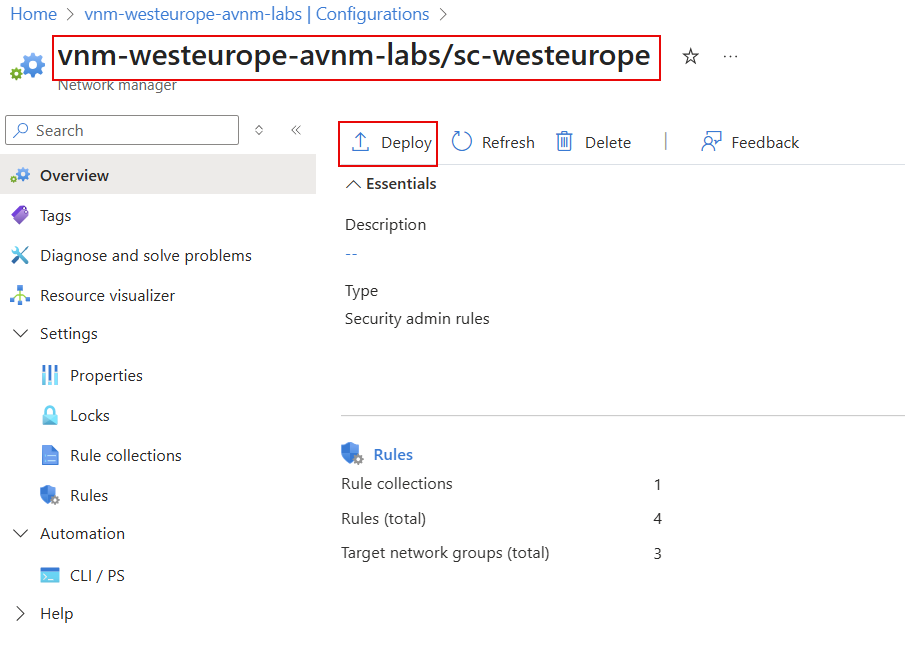
Next, deploy sc-westeurope Security configuration using Virtual Network Manager. Navigate to vnm-westeurope-avnm-labs | Settings | Configurations, select the sc-westeurope Security Configuration, and then click Deploy.
 .
.
Select West Europe as the target region and Deploy.
After deployment is complete, let's verify if security rules fulfilled our requirements.
Try to connect to vm-spoke1-westeurope VM.
# Get vm-spoke1-westeurope VM resource ID
$vmId = (az vm show --name vm-spoke1-westeurope --resource-group rg-westeurope-avnm-labs --query id --output tsv)

az network bastion ssh --name bastion-westeurope --resource-group rg-westeurope-avnm-labs --target-resource-id $vmId --auth-type password --username iac-admin
This time, you will not be able to SSH into this VM, because deny-ssh-and-rdp rule blocks any ssh and rdp traffic.
Try to SSH into hub VM.
# Get vm-hub-westeurope VM resource ID
$vmId = (az vm show --name vm-hub-westeurope --resource-group rg-westeurope-avnm-labs --query id --output tsv)

az network bastion ssh --name bastion-westeurope --resource-group rg-westeurope-avnm-labs --target-resource-id $vmId --auth-type password --username iac-admin
You should now be able to SSH into the hub VM, because allow-ssh-to-hub allows it. Now, from within the hub VM session, try to SSH into the spoke1 VM.
You should be able to SSH into the spoke1 VM because allow-ssh-from-hub rule allows it.
Run curl ifconfig.me and curl google.com commands from hub VM.
You should get response from curl ifconfig.me command because allow-outbound-ifconfig-me rule allows it, and curl google.com should fail because deny-outbound-internet rule blocks it.
Task #2 - Implement Always allow rule
When you define Admin security rule, there is one special type of action called Always allow. Official documentation describes it as follows:
Regardless of other rules with lower priority or user-defined network security groups, allow traffic on the specified port, protocol, and source/destination IP prefixes in the specified direction.
In our current scenario we configured that SSH to spoke1 VM is allowed from hub VM.
Now, let's imagine that imaginary team owning spoke1 VM decided to disable SSH to spoke1 VM by implementing deny Network Security Group (NSG) rule.
Create spoke1-workload-subnet-nsg.bicep file with the following content.
param hubVmIP string = '10.9.0.132'

resource nsg_workload_subnet_spoke1_westeurope 'Microsoft.Network/networkSecurityGroups@2024-07-01' = {
  name: 'nsg-workload-subnet-spoke1-westeurope'
  location: 'westeurope'
  properties: {
    securityRules: [
      {
        name: 'deny-ssh-from-hub-vm'
        type: 'Microsoft.Network/networkSecurityGroups/securityRules'
        properties: {
          protocol: 'TCP'
          sourcePortRange: '*'
          destinationPortRange: '22'
          sourceAddressPrefix: hubVmIP
          destinationAddressPrefix: '*'
          access: 'Deny'
          priority: 100
          direction: 'Inbound'
        }
      }
    ]
  }
}
Deploy spoke1-workload-subnet-nsg.bicep file.
# Make sure that you are at the folder where spoke1-workload-subnet-nsg.bicep file is located
pwd

# Deploy spoke1-workload-subnet-nsg.bicep file
az deployment group create --resource-group rg-westeurope-avnm-labs --template-file spoke1-workload-subnet-nsg.bicep

# Assign nsg-workload-subnet-spoke1-westeurope to subnet-workload of vnet-spoke1-westeurope
az network vnet subnet update --name subnet-workload --resource-group rg-westeurope-avnm-labs --vnet-name vnet-spoke1-westeurope --network-security-group nsg-workload-subnet-spoke1-westeurope
It takes some minutes for NSG to take effect. Connect to hub VM and SSH to vm-spoke1-westeurope.
# Get vm-hub-westeurope VM resource ID
$vmId = (az vm show --name vm-hub-westeurope --resource-group rg-westeurope-avnm-labs --query id --output tsv)

az network bastion ssh --name bastion-westeurope --resource-group rg-westeurope-avnm-labs --target-resource-id $vmId --auth-type password --username iac-admin
# From within hub VM session, try to SSH into the spoke1 VM.
ssh iac-admin@10.9.1.4
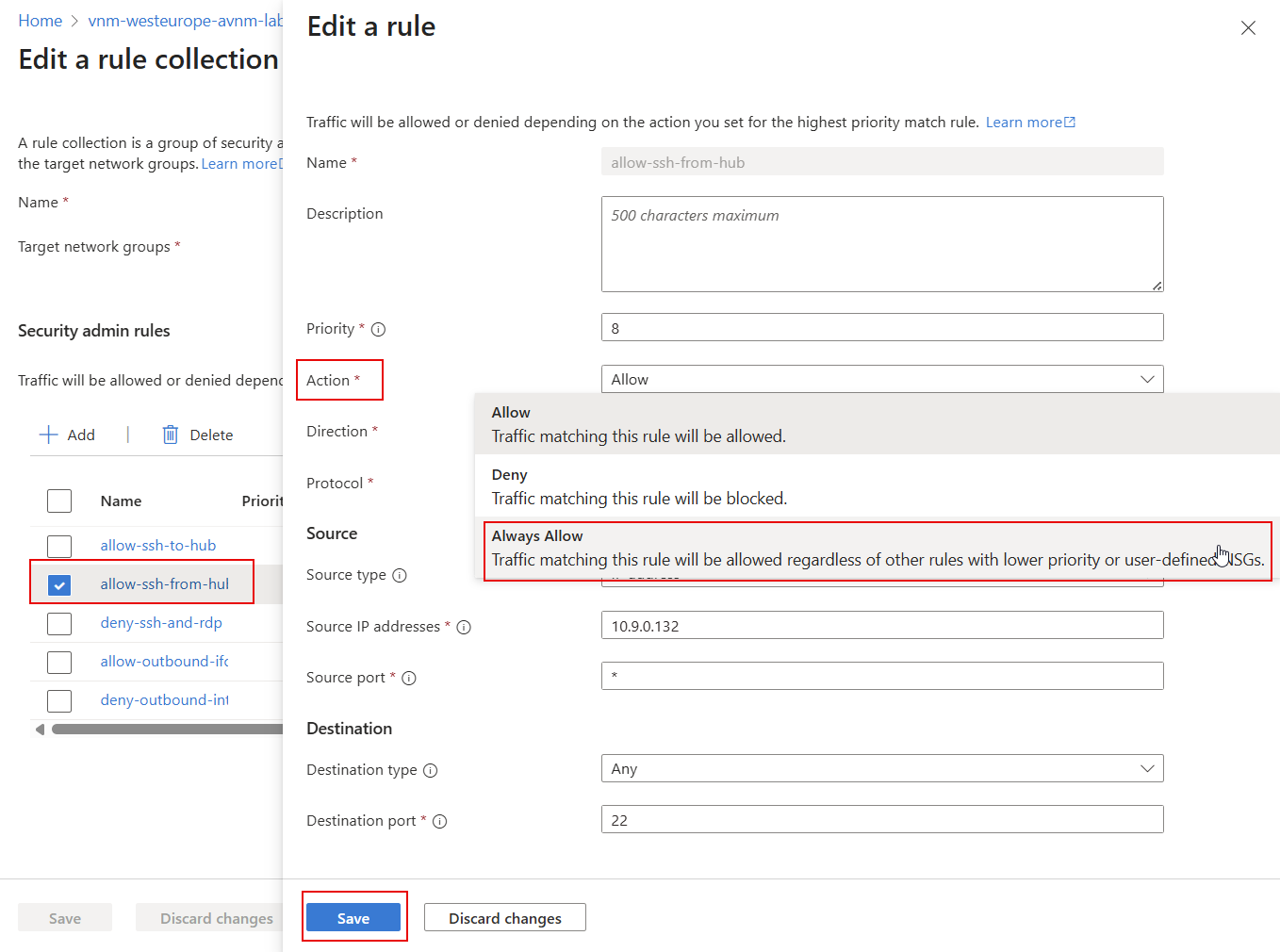
You can't ssh to vm-spoke1-westeurope because now TCP port 22 is blocked by the NSG rule. TO fix this, we should change action type for allow-ssh-from-hub Admin security rule to Always allow.
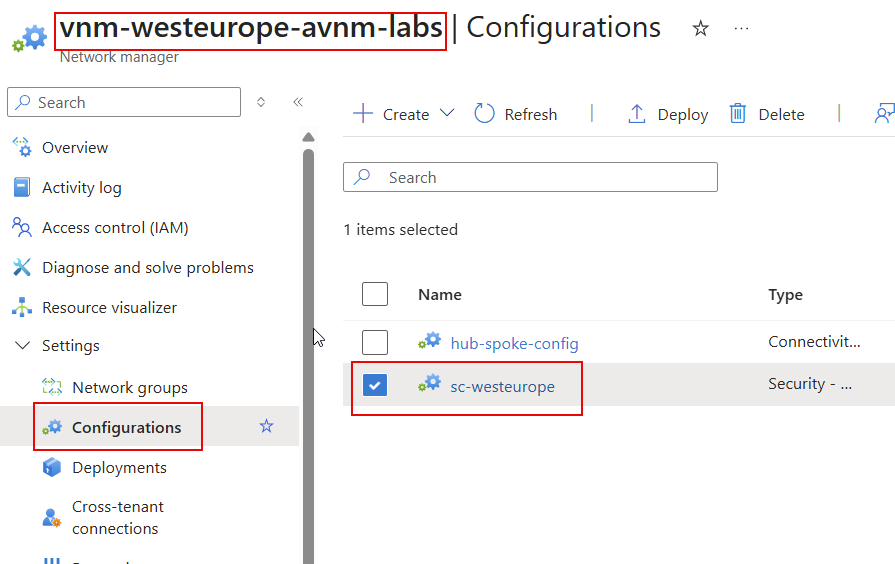
Let's do it from the portal. Navigate to vnm-westeurope-avnm-labs | Settings | Configurations | sc-westeurope.
Then Settings | Rules | allow-ssh-from-hub rule.
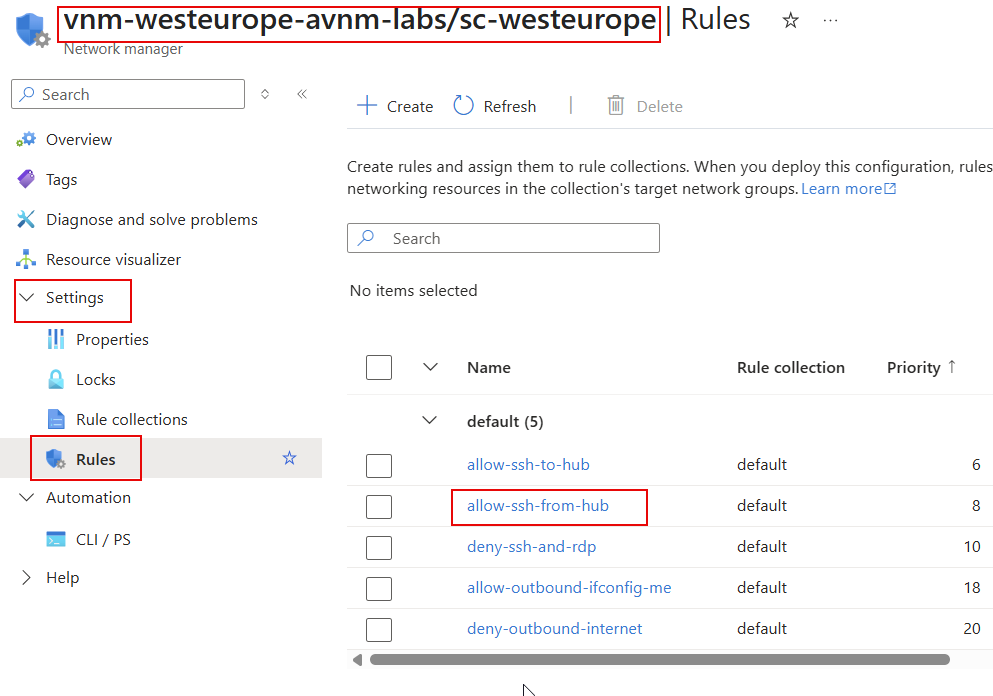
Change allow-ssh-from-hub rule action type to Always allow.
Save and Deploy changes.
.
Select West Europe as the target region and Deploy.
WHen deployed, get back to hub VM session and try to SSH to spoke1 VM again.
# Get vm-hub-westeurope VM resource ID
$vmId = (az vm show --name vm-hub-westeurope --resource-group rg-westeurope-avnm-labs --query id --output tsv)

az network bastion ssh --name bastion-westeurope --resource-group rg-westeurope-avnm-labs --target-resource-id $vmId --auth-type password --username iac-admin
# From within hub VM session, try to SSH into the spoke1 VM.
ssh iac-admin@10.9.1.4
You should be able to SSH into vm-spoke1-westeurope successfully.