lab-02 - Managing Virtual Networks IP addresses using AVNM IPAM
Before we start working with IP Address Management, we need to create new Address Pool in our Virtual Network Manager. This Address Pool will be used to manage IP addresses of our virtual networks.
Some of the tasks require virtual-network-manager extension, so make sure that it's installed.
Task #1 - create new Address Pool using az cli
Let's create new IP Address pool iac-main with address range 10.9.0.0/16.
Use the following command to create a new Address Pool using az cli
az network manager ipam-pool create -n "iac-main" --network-manager-name "vnm-westeurope-avnm-labs" --resource-group "rg-westeurope-avnm-labs" --address-prefixes "['10.9.0.0/16']" --display-name "IaC Main Pool" --description "Main Address Pool for IAC labs"
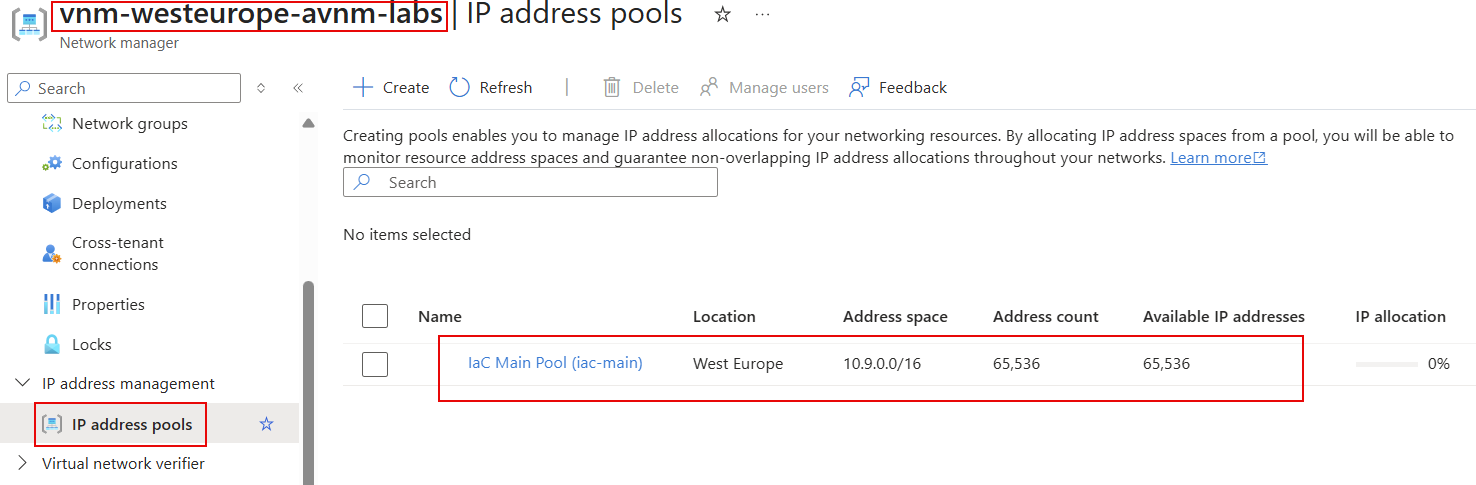
After pool is created you will find it in the list of Address Pools.
Task #2 - Associate existing vnet-hub-westeurope VNet with Address Pool using Portal
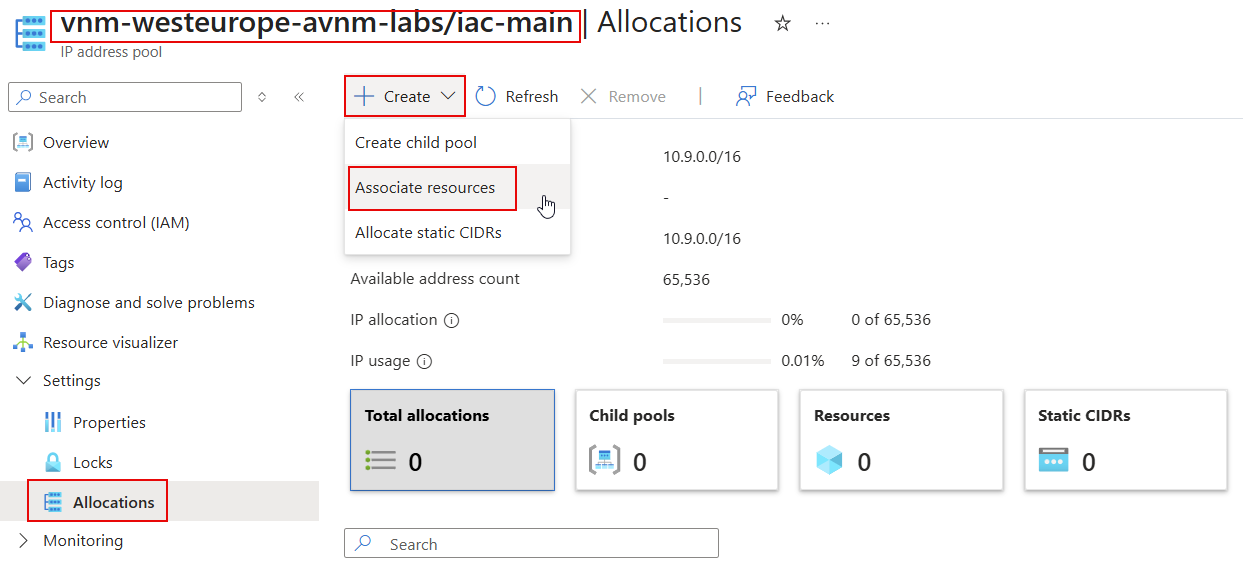
To associate vnet-hub-westeurope virtual network with the IP address pool, navigate to the vnm-westeurope-avnm-labs/iac-main address pool and select Allocations under Settings tab. Click on Associate resources to associate the virtual network with the address pool.
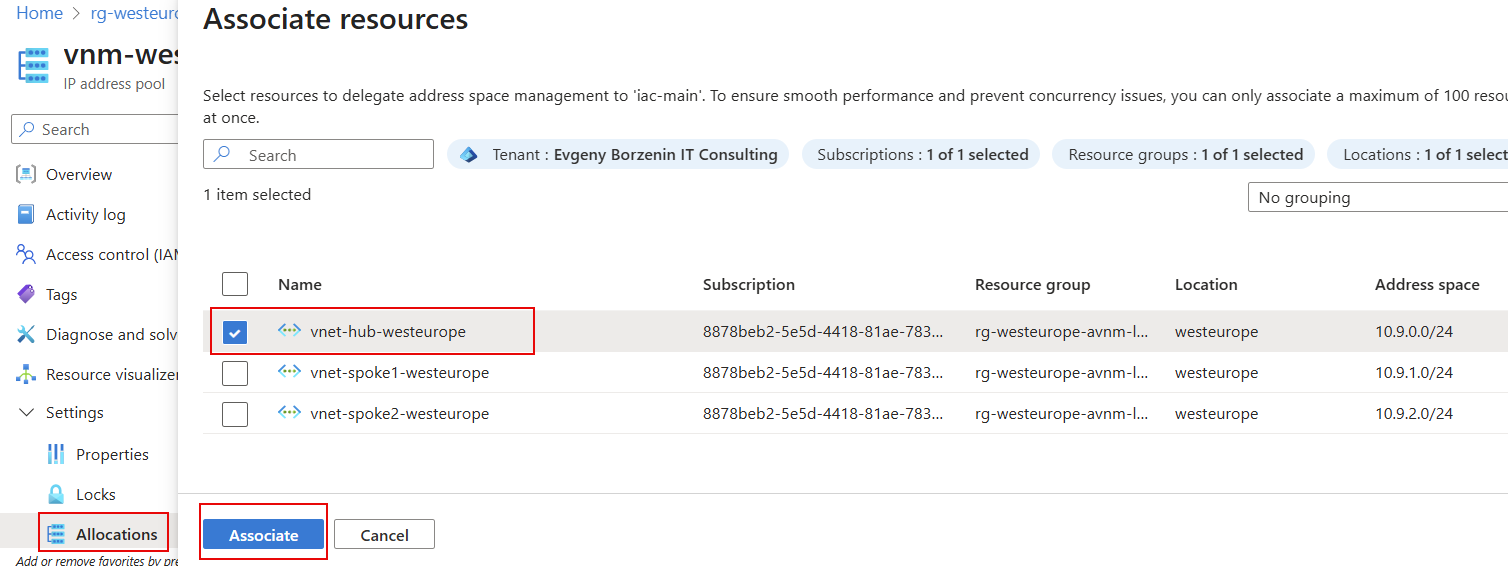
From the list of Virtual Networks, select vnet-hub-westeurope and click Associate.
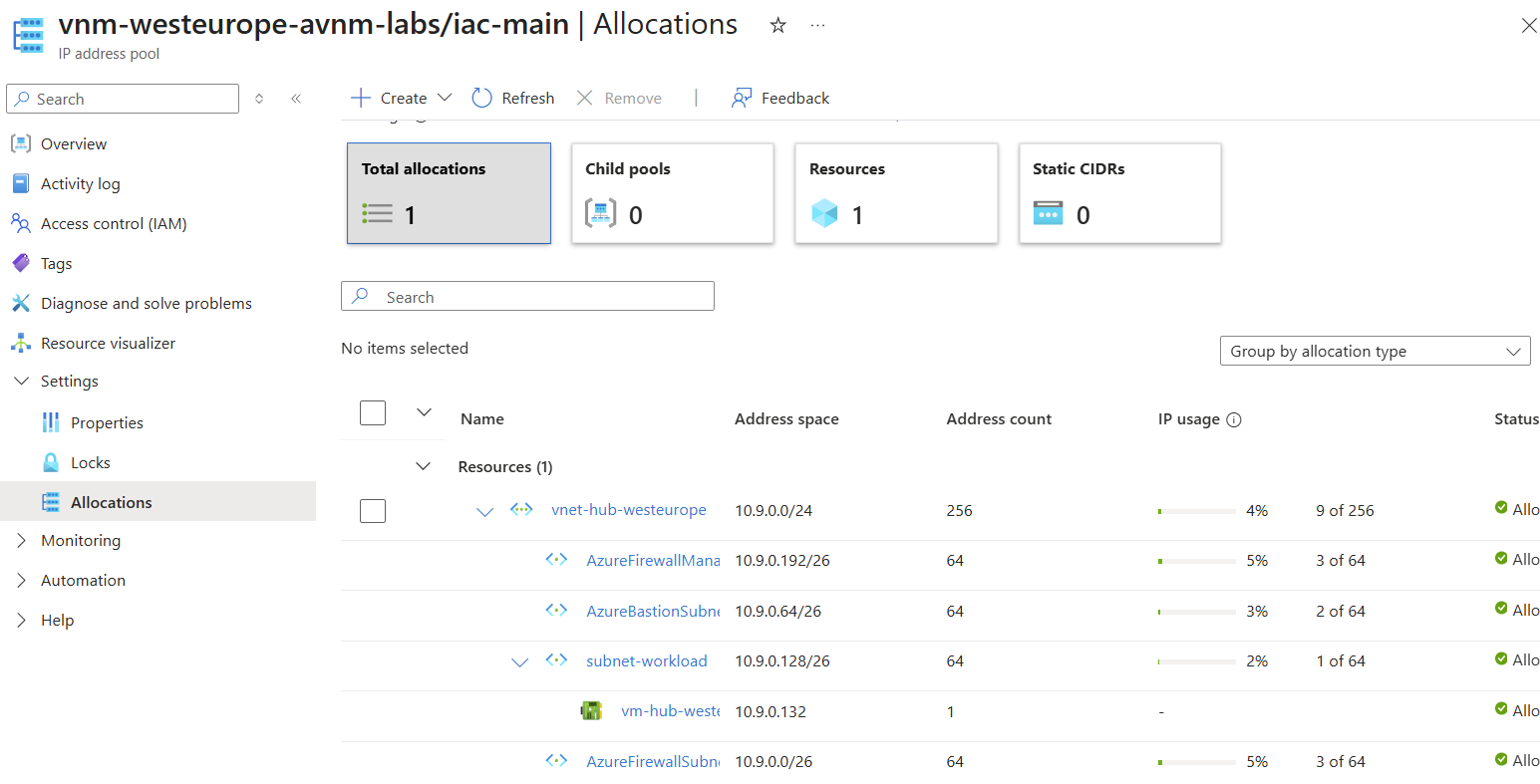
If everything is correct, you will see the vnet-hub-westeurope virtual network, all its subnets, and vm-hub-westeurope-nic-01 NIC associated with vm-hub-westeurope virtual machine in the list of associated resources.
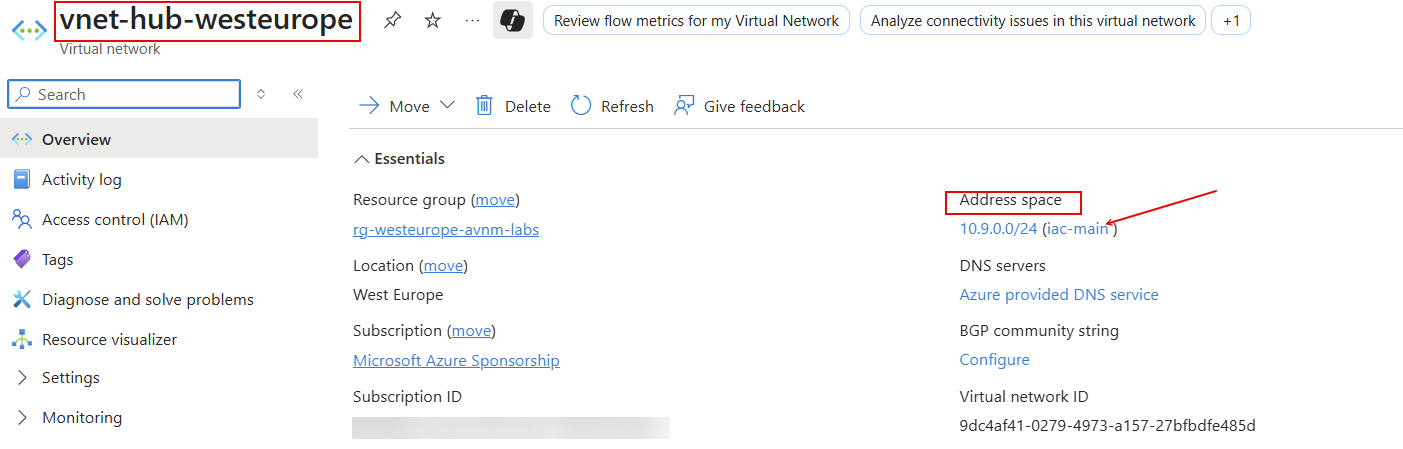
If you navigate to VNet overview page, you can now see that IP range is managed by the IPAM
Task #3 - Associate vnet-spoke1-westeurope VNet with Address Pool using Bicep
You can associate existing virtual network to the IP address pool if VNet address range is withing pool address range. In our case, IP address pool uses 10.9.0.0/16 range and vnet-spoke1-westeurope uses 10.9.1.0/24 range, so if should work.
To associate existing virtual network with the IP address pool using Bicep template, create vnet-spoke1-westeurope.bicep file with the following content:
param parIndex int = 1
param parLocation string = 'westeurope'

var varVNetName = 'vnet-spoke${parIndex}-${parLocation}'

resource ipamPool  'Microsoft.Network/networkManagers/ipamPools@2024-07-01' existing = {
  name: 'vnm-${parLocation}-avnm-labs/iac-main'
}

module modVNet 'br/public:avm/res/network/virtual-network:0.7.0' = {
  name: 'deploy-${varVNetName}-${parIndex}'
  params: {
    addressPrefixes: [
      ipamPool.id
    ]
    ipamPoolNumberOfIpAddresses: '256'
    name: varVNetName
    location: parLocation
    subnets: [
      {
        name: 'subnet-workload'
        ipamPoolPrefixAllocations: [
          {
            pool: {
              id: ipamPool.id
            }
            numberOfIpAddresses: '256'
          }
        ]
      }
    ]
    enableTelemetry: false
  }
}
Original Address Range that was assigned to this VNet was /24 (256 IP addresses), so we should set ipamPoolNumberOfIpAddresses property to 256.
Deploy template.
# Make sure that you are at the folder where vnet-spoke1-westeurope.bicep file is located
pwd

# Deploy vnet-spoke1-westeurope.bicep file
az deployment group create -g rg-westeurope-avnm-labs --template-file vnet-spoke1-westeurope.bicep
Task #4 - Associate vnet-spoke2-westeurope VNet with Address Pool using az cli
To associate existing vnet-spoke2-westeurope virtual network with the address pool using az cli, use the following command:
# Get iac-main IP pool resource Id
$ipamPoolId = (az network manager ipam-pool show -n iac-main --network-manager-name vnm-westeurope-avnm-labs -g rg-westeurope-avnm-labs --query id -o tsv)
# Associate vnet-spoke2-westeurope with iac-main IP pool
az network vnet update --name vnet-spoke2-westeurope -g rg-westeurope-avnm-labs --ipam-allocations [0].number-of-ip-addresses=256 [0].id=$ipamPoolId
Original Address Range that was assigned to this VNet was /24 (256 IP addresses), so we should use this value when specifying number-of-ip-addresses parameter.
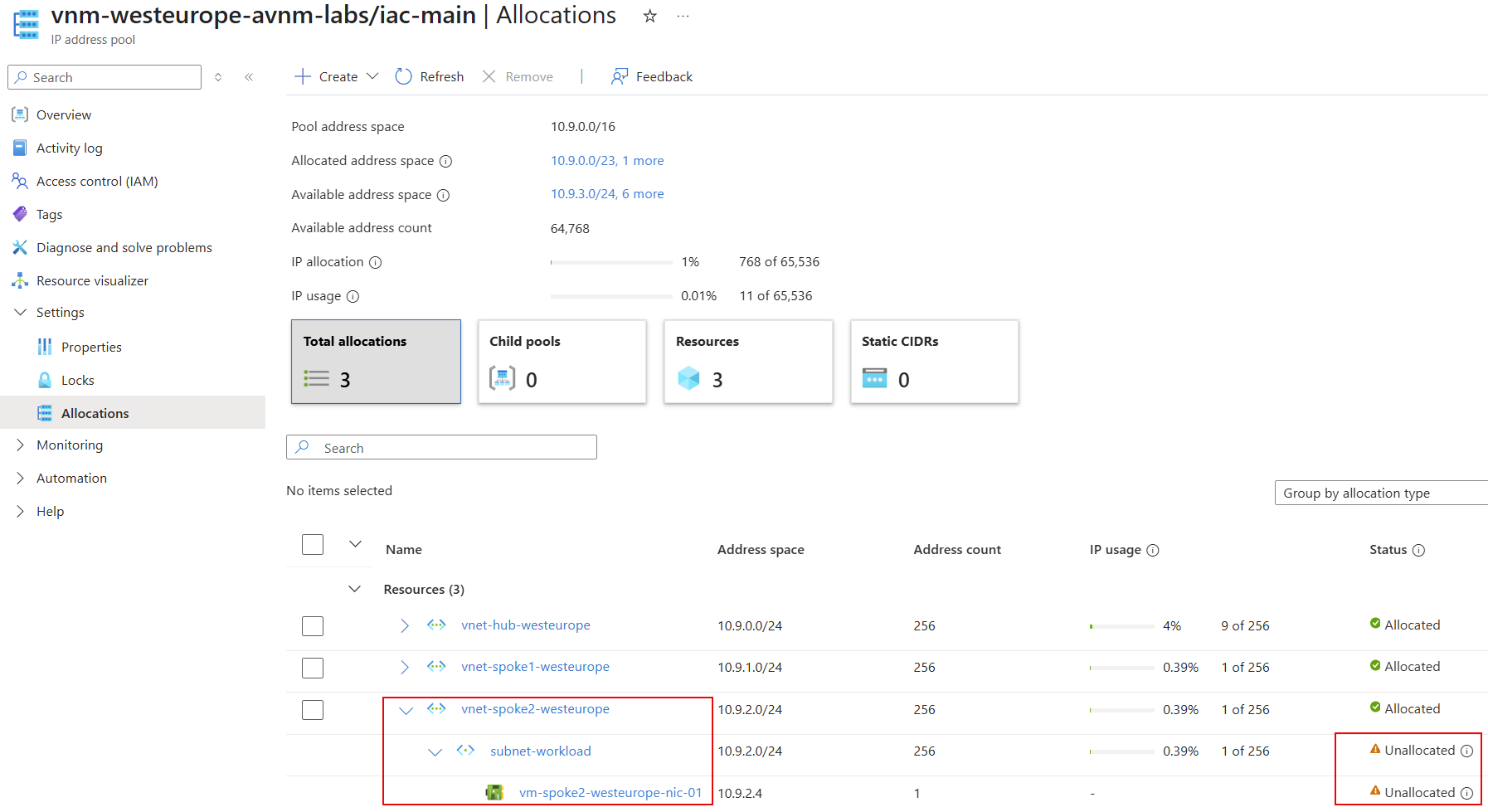
If you check vnm-westeurope-avnm-labs/iac-main | Allocations at the Portal, you should see that the vnet-spoke2-westeurope virtual network is now associated with the iac-main IP address pool, but subnet-workload and vm-spoke2-westeurope-nic-01 NIC are not associated yet. To fix it, you need to associate subnet subnet-workload with IP address pool.
# Get iac-main IP pool resource Id
$ipamPoolId = (az network manager ipam-pool show -n iac-main --network-manager-name vnm-westeurope-avnm-labs -g rg-westeurope-avnm-labs --query id -o tsv)

# Associate subnet-workload with iac-main IP pool
az network vnet subnet update -n subnet-workload --vnet-name vnet-spoke2-westeurope -g rg-westeurope-avnm-labs --ipam-allocations [0].number-of-ip-addresses=256 [0].id=$ipamPoolId
As with VNet, the original Address Range that was assigned to subnet-workload was /24 (256 IP addresses), so we should use this value when specifying number-of-ip-addresses parameter.
Refresh vnm-westeurope-avnm-labs/iac-main | Allocations page and now everything should be allocated.

Task #5 - Create new vnet-online-westeurope VNet with IP range from iac-main pool using Bicep
Create new vnet-online-westeurope.bicep file with the following content:
param parIndex int = 1
param parLocation string = 'westeurope'
param numberOfIpAddresses int = 30

var varVNetName = 'vnet-online${parIndex}-${parLocation}'

resource ipamPool  'Microsoft.Network/networkManagers/ipamPools@2024-07-01' existing = {
  name: 'vnm-${parLocation}-avnm-labs/iac-main'
}

module modVNet 'br/public:avm/res/network/virtual-network:0.7.0' = {
  name: 'deploy-${varVNetName}-${parIndex}'
  params: {
    addressPrefixes: [
      ipamPool.id
    ]
    ipamPoolNumberOfIpAddresses: '${numberOfIpAddresses}'
    name: varVNetName
    location: parLocation
    subnets: [
      {
        name: 'subnet-workload'
        ipamPoolPrefixAllocations: [
          {
            pool: {
              id: ipamPool.id
            }
            numberOfIpAddresses: '${numberOfIpAddresses}'
          }
        ]
      }
    ]
    enableTelemetry: false
  }
}
Deploy it using az cli
# Make sure that you are at the folder where vnet-online-westeurope.bicep file is located
pwd

# Deploy vnet-online-westeurope.bicep file
az deployment group create -g rg-westeurope-avnm-labs --template-file vnet-online-westeurope.bicep
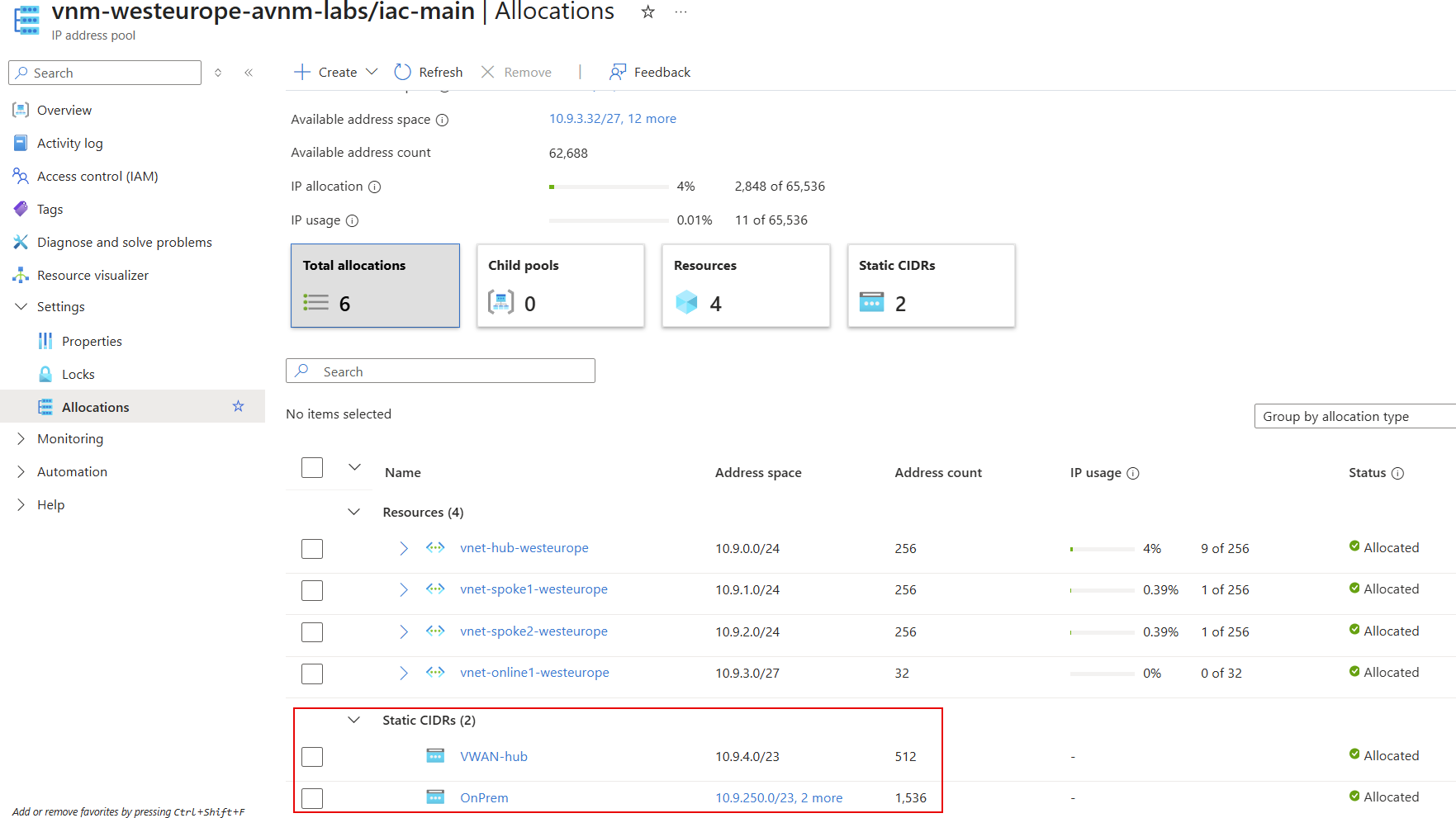
Check Allocations page. You should see new vnet-online1-westeurope VNet with subnet-workload associated with iac-main IP address pool.
Note! In the bicep file, we specified number of IP addresses we need 30, and IPAM set it to the closed range fulfilling that requirements, which is /27 (32 IP addresses).
Task #6 - Allocate static IP range using Bicep
Sometimes you will need to allocate IP range which is either not managed by Azure, or belongs to the services not supported by AVNM (for example Azure Virtual WAN). In that case, you can allocate Static CIDR.
Let's say that our Azure VWAN hub uses 10.9.4.0/23 IP range and on-prem datacenter address ranges are 10.9.250.0/23, 10.9.252.0/23 and 10.9.254.0/23 and we want to allocate them into IPAM.
Create static-ranges.bicep file with the following content:
resource ipamPool'Microsoft.Network/networkManagers/ipamPools@2024-07-01' existing = {
  name: 'vnm-westeurope-avnm-labs/iac-main'
}

resource vwanAllocation 'Microsoft.Network/networkManagers/ipamPools/staticCidrs@2024-07-01' = {
  name: 'VWAN-hub'
  parent: ipamPool
  properties: {
    addressPrefixes: [
      '10.9.4.0/23'
    ]
  }
}

resource onpremAllocation 'Microsoft.Network/networkManagers/ipamPools/staticCidrs@2024-07-01' = {
  name: 'OnPrem'
  parent: ipamPool
  dependsOn: [
    vwanAllocation
  ]
  properties: {
    addressPrefixes: [
      '10.9.250.0/23'
      '10.9.252.0/23'
      '10.9.254.0/23'
    ]
  }
}
Deploy it
# Make sure that you are at the folder where task6.bicep file is located
pwd

# Deploy static-ranges.bicep file
az deployment group create -g rg-westeurope-avnm-labs --template-file static-ranges.bicep
Check Allocations page. You should see new VWAN-hub and OnPrem static IP ranges allocated.