lab-03 - Implement Azure policies to enforce naming convention for your Azure resources
As part of our company policy, we need to enforce naming convention for all Azure resources that we provision. It shouldn't be allowed to create resource if its name doesn't follow naming convention. There are no BuiltIn policies that enforce naming convention, so we need to create custom policy.
We can split this task in two parts: 1. Naming convention for resource groups 2. Naming convention for resources
Let's start with resource groups.
Task #1 - create policy definition to enforce naming convention for resource groups
According to our naming convention, resource group name should start with iac- prefix and end with -rg suffix. We can create policy definition that will enforce this naming convention.
We will use Bicep to create policy definition. Create enforce-naming-convention-rg.bicep file with the following content:
targetScope = 'subscription'

resource resEnforceNamingConventionResourceGroup 'Microsoft.Authorization/policyDefinitions@2021-06-01' = {
  name: 'Enforce-NamingConvention-ResourceGroup'
  properties: {
    policyType: 'Custom'
    mode: 'All'
    displayName: '[IAC] - Enforce naming convention for resource groups'
    description: 'This policy enforces a naming pattern for resource groups.'
    metadata: {
      version: '1.0.0'
      category: 'Naming convention'
    }
    policyRule: {
      if: {
        allOf: [
          {
            field: 'type'
            equals: 'Microsoft.Resources/subscriptions/resourceGroups'
          }
          {
            allOf: [
              {
                field: 'name'
                notLike: 'dashboards'
              }
              {
                field: 'name'
                notLike: 'cloud-shell-storage-*'
              }
            ]
          }
          {
            anyOf: [
              {
                field: 'name'
                notLike: '*-rg'
              }
              {
                field: 'name'
                notLike: 'iac-*'
              }
            ]
          }
        ]
      }
      then: {
        effect: 'deny'
      }
    }
    parameters: {}
  }
}
Let's go through the code block by block.
We want to apply this policy definition on subscription level, so we set targetScope to subscription.
Under properties, we define policy definition name, policy type, mode, display name, description, metadata, parameters and policy rule.
This policy definition doesn't require any parameters.
Policy rule contains three rule sets:
1. If resource type is Microsoft.Resources/subscriptions/resourceGroups
2. If resource name doesn't start with iac- and doesn't end with -rg
3. If resource name doesn't contain dashboards or cloud-shell-storage-*
If all three conditions are met, then effect is set to deny, which means that resource creation will be denied.
If we translate these rules in plain English, we get the following:
"If resource group name doesn't start with
iac-and doesn't end with-rgthen deny resource group creation. Don't apply this policy to resource groups that nameddashboardsorcloud-shell-storage-*."
The rule 3 is required because we don't want to deny creation of resources groups managed by Azure Portal or Azure Products, like dashboards and cloud-shell-storage-* resource groups. These resource groups are created by Azure portal and we don't have control over their names. In your environment, you might have other resource groups that you want to exclude from this policy.
Next, Deploy policy definition by running the following command:
You can verify that policy definition was created by running the following command:
az policy definition list --query "[?displayName=='[IAC] - Enforce naming convention for resource groups']"
# or
az policy definition show -n Enforce-NamingConvention-ResourceGroup
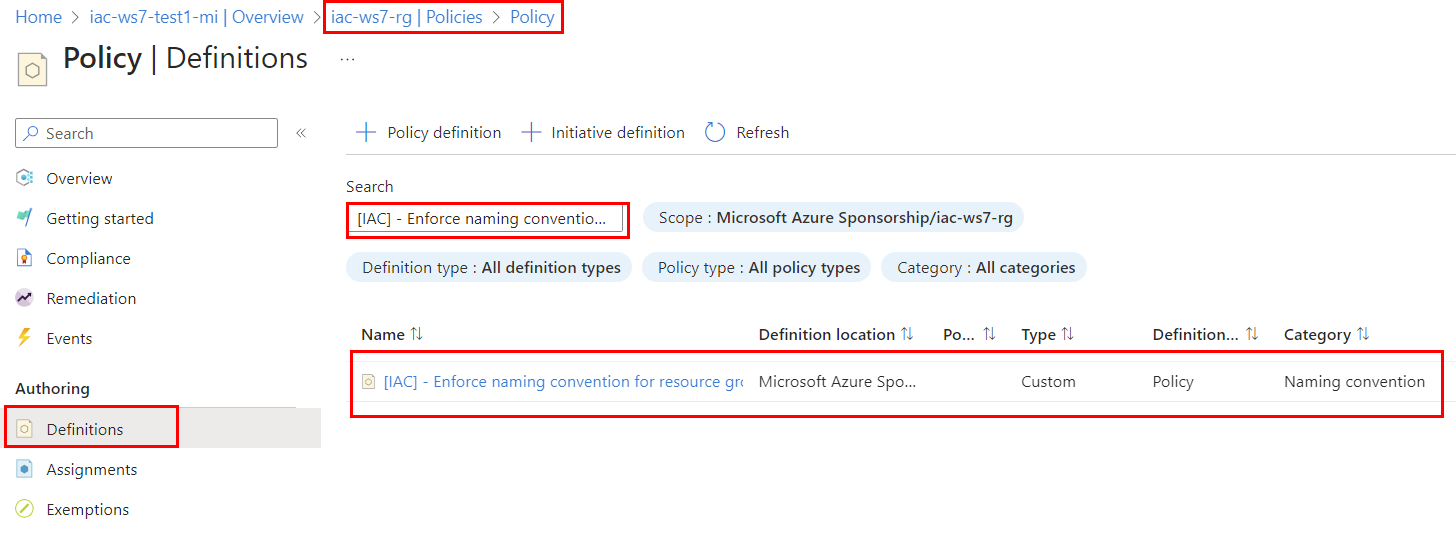
or you can search it in the portal under iac-ws7-rg->Settings-Policy->Definitions. Search for [IAC] - Enforce naming convention for resource groups and you should see newly created policy definition.
Task #2 - create policy assignment for Enforce-NamingConvention-ResourceGroup policy using Bicep
Now that we have policy definition, we need to assign it to subscription. We will use Bicep to create policy assignment. Create enforce-naming-convention-rg-assignment.bicep file with the following content:
targetScope = 'subscription'

var varPolicyAssignmentName = '[IAC] - Enforce NamingConvention for ResourceGroups'

resource resEnforceNamingConventionResourceGroup 'Microsoft.Authorization/policyDefinitions@2021-06-01' existing = {
  name: 'Enforce-NamingConvention-ResourceGroup'
}

resource resAssignment 'Microsoft.Authorization/policyAssignments@2022-06-01' = {
    name: varPolicyAssignmentName
    properties: {
      displayName: varPolicyAssignmentName
      policyDefinitionId: resEnforceNamingConventionResourceGroup.id
      parameters: {}
    }
}

output outAssignmentId string = resAssignment.id
Deploy policy assignment by running the following command:
az deployment sub create --template-file .\enforce-naming-convention-rg-assignment.bicep --location norwayeast
Check that policy assignment was created:
Task #3 - test policy
Let's test policy assignment by creating resource group that doesn't follow naming convention. Run the following command:
It should be denied with the following error message:(RequestDisallowedByPolicy) Resource 'foobar-ws7-test-rg' was disallowed by policy. Policy identifiers: '[{"policyAssignment":{"name":"[IAC] - Enforce NamingConvention for ResourceGroups","id":"/subscriptions/00000000-0000-0000-0000-000000000000/providers/Microsoft.Authorization/policyAssignments/[IAC] - Enforce NamingConvention for ResourceGroups"},"policyDefinition":{"name":"[IAC] - Enforce naming convention for resource groups","id":"/subscriptions/8878beb2-5e5d-4418-81ae-783674eea324/providers/Microsoft.Authorization/policyDefinitions/Enforce-NamingConvention-ResourceGroup"}}]'.`
If you look closely to the output, you can also find evaluationDetails that shows how policy evaluated policy rules.
Check the last item in the evaluationDetails array. If should contain
 {
    "result": "True",
    "expressionKind": "Field",
    "expression": "name",
    "path": "name",
    "expressionValue": "iac1-ws71-rg",
    "targetValue": "iac-*",
    "operator": "NotLike"
}
That means that resource group name iac1-ws71-rg doesn't match iac-* pattern, so policy evaluation result is True and resource creation is denied.
Let's try another test-case. Run the following command:
Check the evaluationDetails array.
{
    "result": "True",
    "expressionKind": "Field",
    "expression": "name",
    "path": "name",
    "expressionValue": "iac-ws71-rg1",
    "targetValue": "*-rg",
    "operator": "NotLike"
}
iac-ws71-rg1 doesn't match *-rg pattern, so policy evaluation result is True and resource creation is denied.
Now, let's test that policy allows resource group name from the exception list. Run the following command:
It should allow resource group creation.Last test-case. Run the following command:
It should allow resource group creation.
Task #4 - create policy definition to enforce naming convention for resources
We can use the same logic we used for Resource groups to validate if resource name follows naming convention. That is - to check prefix and suffix of resource name.
We can either create separate policy definition for each resource type or we can create one policy definition and use it for different resource types.
Azure policy definitions support input parameters, and we can use policy functions to reference them. There is a corresponding strongType metadata property – resourceTypes, to validate inputs against existing resource types in your subscription.
Let's create "generic" policy definition that will enforce naming convention for resources. Create enforce-naming-convention-resources.bicep file with the following content:
targetScope = 'subscription'

resource resEnforceNamingConventionResource 'Microsoft.Authorization/policyDefinitions@2021-06-01' = {
  name: 'Enforce-NamingConvention-Resources'
  properties: {
    policyType: 'Custom'
    mode: 'All'
    displayName: '[IAC] - Enforce naming convention for resources'
    description: 'This policy enforces a naming pattern for resources.'
    metadata: {
      version: '1.0.0'
      category: 'Naming convention'
    }
    parameters: {
      resourceType: {
        type: 'string'
        metadata: {
          displayName: 'Resource type'
          description: 'The resource type to enforce naming convention.'
          strongType: 'resourceType'
        }
      }
      resourceAbbreviation: {
        type: 'string'
        metadata: {
          displayName: 'Resource abbreviation'
          description: 'The resource abbreviation to enforce naming convention.'
        }
      }
    }
    policyRule: {
      if: {
        allOf: [
          {
            field: 'type'
            equals: '[parameters(\'resourceType\')]'
          }
          {
            anyOf: [
              {
                field: 'name'
                notLike: '[concat(\'*-\', parameters(\'resourceAbbreviation\'))]'
              }
              {
                field: 'name'
                notLike: 'iac-*'
              }
            ]
          }
        ]
      }
      then: {
        effect: 'deny'
      }
    }
  }
}
Let's go through the code block by block.
Enforce-NamingConvention-Resources policy will require two parameters:
1. resourceType - the resource type to enforce naming convention. For example, Microsoft.ManagedIdentity/userAssignedIdentities or Microsoft.Network/networkSecurityGroups
2. resourceAbbreviation - resource abbreviation to enforce naming convention. For example, mi for Managed Identities or nsg for Network Security Groups
These parameters are defined under parameters section:
...
parameters: {
  resourceType: {
    type: 'string'
    metadata: {
      displayName: 'Resource type'
      description: 'The resource type to enforce naming convention.'
      strongType: 'resourceType'
    }
  }
  resourceAbbreviation: {
    type: 'string'
    metadata: {
      displayName: 'Resource abbreviation'
      description: 'The resource abbreviation to enforce naming convention.'
    }
  }
}
...
Note, that resourceType parameter has strongType metadata property. This property is used to validate input parameter against existing resource types in your subscription.
The policyRule section looks almost the same as for resource groups policy definition. The difference is that we use parameters values in the rule condition with [parameters(\'resourceType\')] and [parameters(\'resourceAbbreviation\')] Bicep constructs.
Deploy policy definition by running the following command:
az deployment sub create --template-file .\enforce-naming-convention-resources.bicep --location norwayeast
Check that policy definition was created:
az policy definition list --query "[?displayName=='[IAC] - Enforce naming convention for resources']"
# or
az policy definition show -n Enforce-NamingConvention-Resources
Now, let's create new Enforce naming convention for resources policy assignment for Managed Identities resource type. Create enforce-naming-convention-mi-assignment.bicep file with the following content:
param parPolicyDefinitionName string = 'Enforce-NamingConvention-Resources'

var varPolicyAssignmentName = '[IAC] - Enforce NamingConvention for Managed Identity'

resource resAssignment 'Microsoft.Authorization/policyAssignments@2022-06-01' = {
    name: varPolicyAssignmentName
    properties: {
      displayName: varPolicyAssignmentName
      policyDefinitionId: subscriptionResourceId('Microsoft.Authorization/policyDefinitions', parPolicyDefinitionName)
      parameters: {
        resourceType: {
          value: 'Microsoft.ManagedIdentity/userAssignedIdentities'
        }
        resourceAbbreviation:{
          value: 'mi'
        }
      }
    }
}

output outAssignmentId string = resAssignment.id
This policy assignment will be deployed at the scope of iac-ws7-rg Resource Group. Enforce-NamingConvention-Resources policy definition is deployed to the scope of your subscription. To get policy definition id, we use Bicep subscriptionResourceId function.
...
policyDefinitionId: subscriptionResourceId('Microsoft.Authorization/policyDefinitions', parPolicyDefinitionName)
...
This function takes resource type and resource name parameters (Microsoft.Authorization/policyDefinitions and parPolicyDefinitionName) and it returns policy definition id.
Enforce-NamingConvention-Resources policy expects two parameters:
1. resourceType - the resource type to enforce naming convention to. In our case it is Microsoft.ManagedIdentity/userAssignedIdentities
2. resourceAbbreviation - resource abbreviation to enforce naming convention. Based on our naming conventions, Managed Identities must be suffixed with mi
...
parameters: {
  resourceType: {
    value: 'Microsoft.ManagedIdentity/userAssignedIdentities'
  }
  resourceAbbreviation:{
    value: 'mi'
  }
}
...
Deploy policy assignment to the scope of iac-ws7-rg Resource Group by running the following command:
az deployment group create --template-file .\enforce-naming-convention-mi-assignment.bicep -g iac-ws7-rg
Check that policy assignment was created:
Task #5 - test policy
Now let's test policy assignment by creating managed identity that doesn't follow naming convention. Run the following command:
It should be denied by the [IAC] - Enforce NamingConvention for Managed Identity. If you check the evaluationDetails array, you should see the following:
{
    "result": "True",
    "expressionKind": "Field",
    "expression": "name",
    "path": "name",
    "expressionValue": "foobar-ws7-test-mi",
    "targetValue": "iac-*",
    "operator": "NotLike"
}
Now, let's try to create managed identity that follows naming convention. Run the following command:
It should be allowed by the policy.